
Form submissions in your inbox, without a backend.
Already have a form? Point it at PortForm and every submission lands in your inbox. No server to run, no JavaScript required. 300 submissions every 30 days free.
No credit card · No trial clock · The demo needs no signup
<form action="https://app.portform.co/api/submit" method="POST">
  <input type="hidden" name="access_key"
         value="your-access-key" />
  <input type="email" name="email" required />
  <textarea name="message" required></textarea>
  <button type="submit">Send</button>
</form>New submission from PortForm
reply-to: jordan@example.comNew submission via Contact form.
| name | Jordan Fisher |
| jordan@example.com | |
| message | Do you support file uploads on the Pro plan? |
Sent by PortForm
- Stored first
- Every submission is saved before we try to deliver it.
- Retried, not dropped
- Failed deliveries are retried, then flagged for you.
- 300 free / 30 days
- A real free tier on a rolling window. No card, no trial clock.
- HTML
- React
- Next.js
- Vue
- Svelte
- Astro
- Hugo
- WordPress
- Framer
- Webflow
What is PortForm?
PortForm is the backend for your forms. Point a form’s action at us and we handle what happens after submit, so you can launch a contact form, waitlist, or signup page without building the storage, spam filtering, email, and retries behind it. You could build all that yourself; PortForm is for when you’d rather not.
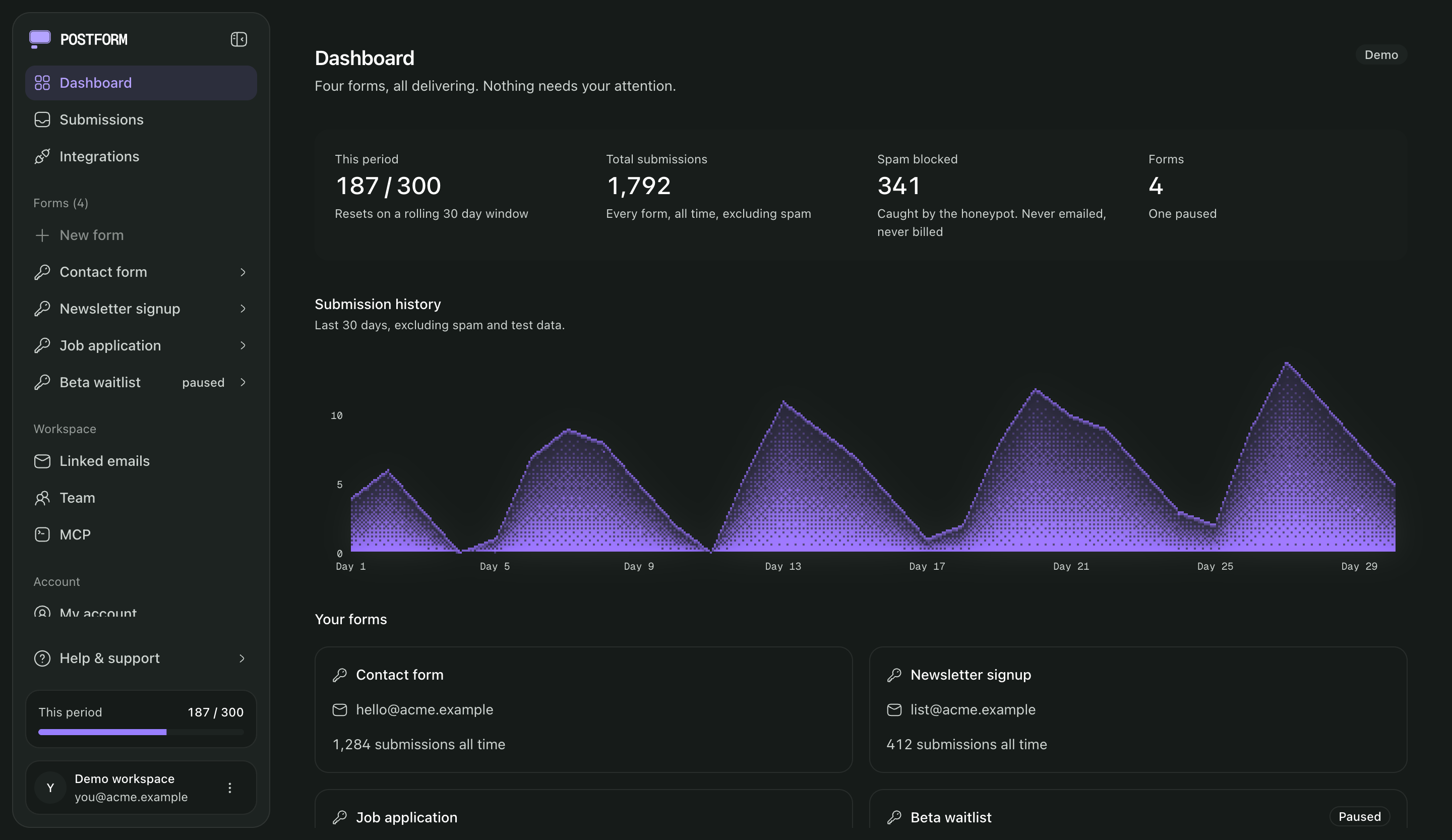
Nothing gets silently lost.
Storage happens first. Email and integrations are best-effort on top of a record that already exists — a failed integration delivery is retried, then flagged, never dropped without a trace.
- Committed — written before anything else runs.
- Best-effort — retried, then flagged. Never silent.
Submission arrives
Validated at the endpoint
Stored
GuaranteedWritten to the database before anything else
Emailed
Sent to your inbox, reply-to the submitter
Forwarded
Delivered to Slack, Sheets, a webhook
Retried
5× · ~2.5hOnward deliveries — then flagged for you, never dropped
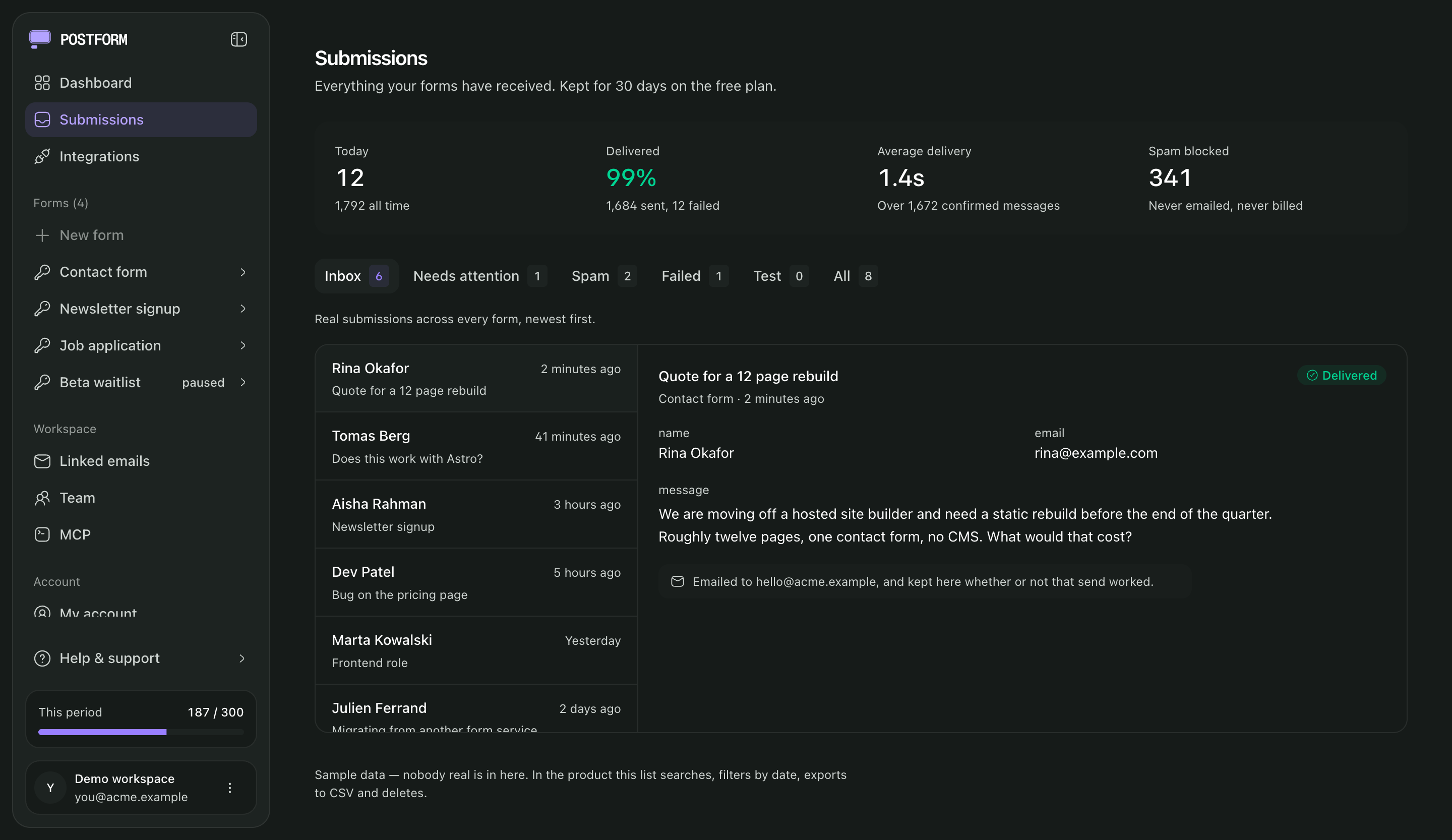
A record, not just a notification.
Every submission is stored and sorted into views. Open one and you see exactly what was posted, which form it came through, whether the honeypot caught it, and whether the send landed.
- Inbox
- Needs attention
- Spam
- Failed
- Test
- All
Bots don’t reach your inbox.
Four checks run on every submission before it counts as real. Blocked attempts are logged so you can see them, never emailed, never counted against your quota.
- honeypotA hidden field people never see and bots fill in.
- disposable_addressKnown throwaway email domains are filtered as spam.
- link_densityBodies that are mostly URLs are held back.
- rate_limitPer-key limits blunt bursts from one source.
Add a visible challenge when you want one. None is on by default.
- hCaptchaEvery plan
- reCAPTCHAPro
- Cloudflare TurnstilePro
Describe your form. Let AI wire it up.
Say what fields you need and get a prompt that makes Claude, ChatGPT, Cursor or v0 write the form, already pointed at PortForm with the honeypot and access key in place. No SDK, no backend for the assistant to invent.
Or let an agent create forms and read submissionsBuild an HTML form and connect it to PortForm, a form-to-email backend. I don't want to write or run any server code. PortForm receives the submission, stores it, filters spam, and emails it to me.
What I want:
A contact form with name, email, and a message.
Wire it to PortForm:
- Make it a plain <form action="https://app.portform.co/api/submit" method="POST"> that works even with zero JavaScript.
- Add this hidden field so the submission reaches my inbox:
<input type="hidden" name="access_key" value="your-access-key" />
- Keep this honeypot field exactly as written, it's how spam bots are caught:
<input type="checkbox" name="botcheck" style="display:none" tabindex="-1" autocomplete="off" />
- Do NOT write any backend, database, or email-sending code. PortForm does all of that.
Reference:
- Integration guide: https://www.portform.co/docs
- Machine-readable spec: https://www.portform.co/llms.txtManage your forms from Claude Code.
PortForm speaks MCP. Point any MCP client at your workspace with a workspace token. It acts as you and never above you — the token carries your own role, and the server exposes eight tools for forms and submissions. Billing, members and integrations stay in the dashboard.
- Create forms
- Read submissions
- Send a test submission
- Diagnose form markup
Add the server
{
  "mcpServers": {
    "portform": {
      "url": "https://app.portform.co/api/v1/mcp",
      "headers": { "Authorization": "Bearer ${PORTFORM_TOKEN}" }
    }
  }
}
Then just ask
> create a contact form for acme.com

● portform · create_form
  ↳ name: "Acme contact"
    destination: hello@acme.com
  ✓ form created, access key ready

> is this contact form wired up right?

● portform · diagnose
  ✓ action points at PortForm
  ✓ access_key matches this key
! no honeypot field — add the hidden botcheck inputAgent sandbox
Build before you sign up.
An AI agent can create a real PortForm endpoint anonymously — no account, no token — wire it into your code, send a few test submissions, and confirm they arrived. When it works, it hands you a claim link: you sign in and keep the exact same form and access key. The building happens before the signup, not after.
1. Create
The agent calls the public sandbox endpoint and gets a real access key back, with no account.
2. Wire
It drops the snippet into your form, or points existing markup at the key.
3. Test
Up to 5 test submissions prove the form end to end. They are stored, never emailed.
4. Verify
A status check confirms the submissions were received.
5. Claim
You open the claim link and sign in. The form becomes yours — same id, same submit URL, test history intact.
Sandboxes are temporary — for building and testing, not production. An unclaimed one expires within a day; claim it to keep the form.
See how agents work with PortFormSend every submission to Slack, Sheets, or a webhook.
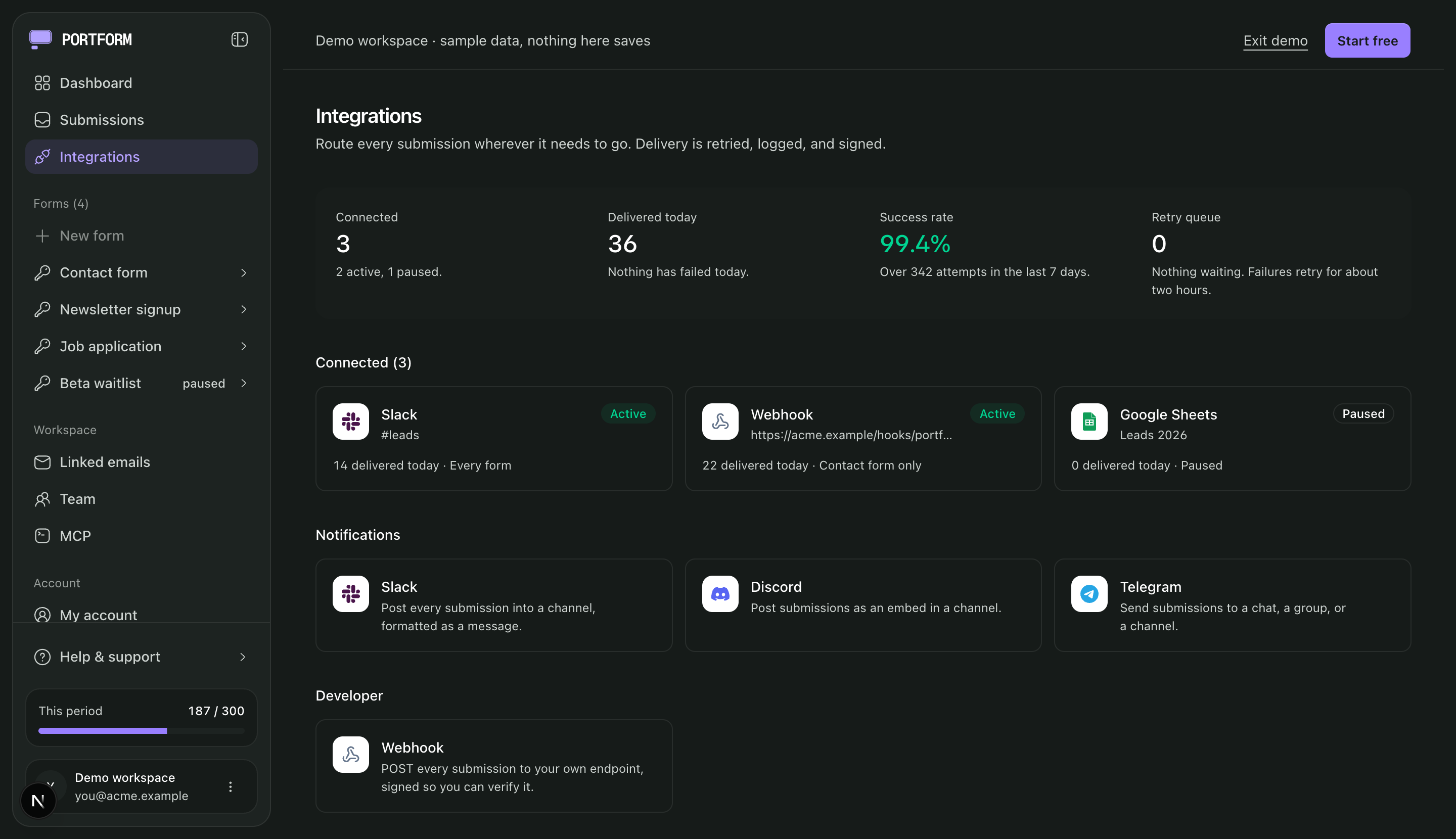
Deliveries are signed, retried, and logged, with a success rate and retry queue you can see. Which plan each part belongs to is in the pricing table.
New submission
from any form
Native integrations
- Slack
- Discord
- Telegram
- Google Sheets
- Notion
- Airtable
- HubSpot
Via webhooks & automation
- Webhooks
- Zapier
- Make
- n8n
More once a form is doing real work.
See what’s on each plan →Autoresponders
Reply to whoever submitted with a confirmation email.
CC recipients
Copy extra addresses on a form’s notifications.
File attachments
Accept uploads alongside the other fields.
Choose which websites can submit
Only accept submissions from websites you specify: a convenience control, not a security boundary.
One tag on the form you already have.
- 1
Create a form
Sign up and you get an access key and a destination address straight away.
- 2
Paste the snippet
Set your form action to our endpoint and drop the key in a hidden input.
- 3
Read your mail
Submissions arrive by email and stay in the dashboard for 30 days.
<form action="https://app.portform.co/api/submit" method="POST">
  <input type="hidden" name="access_key" value="your-access-key" />
  <input type="email" name="email" required />
  <textarea name="message" required></textarea>
  <button type="submit">Send</button>
</form>Start from a ready-made form.
6 complete forms (contact, survey, upload, widgets) with the endpoint and honeypot already wired in. Preview one, copy it, change the access key.
- Basic HTML contact formName, email, message. No JavaScript at all.HTML · CSS
- Ajax contact formPosts with fetch and swaps in a success message in place.HTML · CSS · JavaScript
- JavaScript form validationInline per-field errors before anything is sent.HTML · CSS · JavaScript
- Multi-column contact formTwo columns on desktop, one on a phone, with a subject select.HTML · CSS
- Masked phone inputFormats a phone number as it is typed, and posts the digits.HTML · CSS · JavaScript
- Contact form with dark modeFollows the visitor’s system theme with one media query.HTML · CSS
The people filling in your forms are your data subjects.
You’re the controller, we’re the processor, and there’s a DPA you can read before you sign up.
- Kept, then purged : submissions and request and delivery logs are retained for 30 days, then deleted.
- Delete on demand : remove any submission from the dashboard the moment you no longer need it.
- One-click export : pull everything (keys, submissions, integrations and audit events) as one JSON file, or a form’s submissions as CSV.
Built by people who ship.
Swapped a flaky serverless function for one form tag. Submissions just show up in my inbox now, and I stopped thinking about it.
Maya Osei
Founder, Studio North
The stored-first thing is the whole reason I switched. A downstream delivery failed once, it was in the dashboard waiting, retried on its own. Nothing lost.
Daniel Reyes
Founder, Reyes Labs
Set up a contact form on a static site in about a minute, no backend, no card. The free tier is genuinely enough for what I ship.
Priya Nair
Founder, Fieldnote
Pricing that starts at nothing.
The free tier is a hard cap, not a trial: 300 submissions every rolling 30 days from your own last reset. Go over and submissions are refused with an error you can read, never billed by surprise, never silently dropped.
Personal
Free
Free forever
A hard cap, not a countdown
Create your formNo credit card required
- Unlimited forms
- 300 submissions per rolling 30 days
- Accept submissions from any website
- 2 verified destination addresses
- Advanced spam protection
- hCaptcha integration
- Custom redirect page
Pro
Popular choice$9/mo
Billed monthly
Save $17 a year with yearly billing
Secure payment by Paddle.
Cancel anytime.
- Everything in Personal
- 10,000 submissions per rolling 30 days
- Team collaboration
- File upload / attachments
- reCAPTCHA & Cloudflare Turnstile
- Autoresponders / auto reply
- Choose which websites can submit
- 3rd party integrations (webhooks)
- Google Sheets, Notion, Slack, etc.
- 10 verified destination addresses
- Add CC emails & more
Agency & Team
$29/mo
Billed monthly
Save $60 a year with yearly billing
Secure payment by Paddle.
Cancel anytime.
- Everything in Pro
- 20,000 submissions per rolling 30 days
- 20 verified destination addresses
- Client workspaces — run each client from your own account
- Add more destination addresses any time
- Priority support — your tickets go to the front of the queue
Questions people actually ask
Is my access key a secret?
No, and it is not meant to be. It is a routing id, the same way a mailto: address is. It says where a submission goes, not who is allowed to send one. Anyone can read it in your page source, which is why the protection is per-key rate limiting, spam filtering and quota rather than secrecy. Leaking one is not an incident; if a key is being abused, rotate it in the dashboard.
What happens when I hit 300 submissions?
New submissions are rejected with a clear error until the window rolls over. Nothing is silently dropped, nothing is billed, and everything already stored stays where it is. The window is a rolling 30 days from your last reset, not a calendar month, so there is no first-of-the-month stampede and no short-February edge case. The dashboard warns you well before you get there, and shows the pace you are on.
How long are submissions kept?
Submissions, request logs and delivery logs are retained for 30 days, then purged. Export what you want to keep as CSV, or pull everything (keys, submissions, integrations and audit events) as one JSON file.
Do you send the email from my domain?
Notifications come from our sending domain with your submitter as the reply-to, so hitting reply answers the person who filled in the form. No DNS setup on your side.
What about the data of people who fill in my forms?
They are your data subjects, and we are the processor. There is a DPA you can read before you sign up, submissions are deletable from the dashboard, and a full export is one click.
Does it work with React, Vue, Astro, Hugo, WordPress?
Yes. The endpoint takes form encoding, multipart and JSON, so anything that can make an HTTP request can use it. The docs carry a ready-made snippet for each.
Everything else is in the docs.
Your form works in about a minute.
Create an account, copy your access key, paste the snippet. Or look around the demo first. It takes no signup and no email address.